Fixing anchor link offset behind sticky headers with CSS scroll-padding
Explains how to use scroll-padding and scroll-margin to prevent anchor links from scrolling underneath fixed or sticky headers. Replaces old JavaScript offset calculations with native CSS.
Paul Radford — Full-Stack Developer & Editor. Paul is a full-stack developer and editor of template.tips. Articles here are AI-drafted and reviewed by Paul, who knows the code well enough to catch what's wrong and cut the hype.
Fixing anchor link offset behind sticky headers with CSS scroll-padding
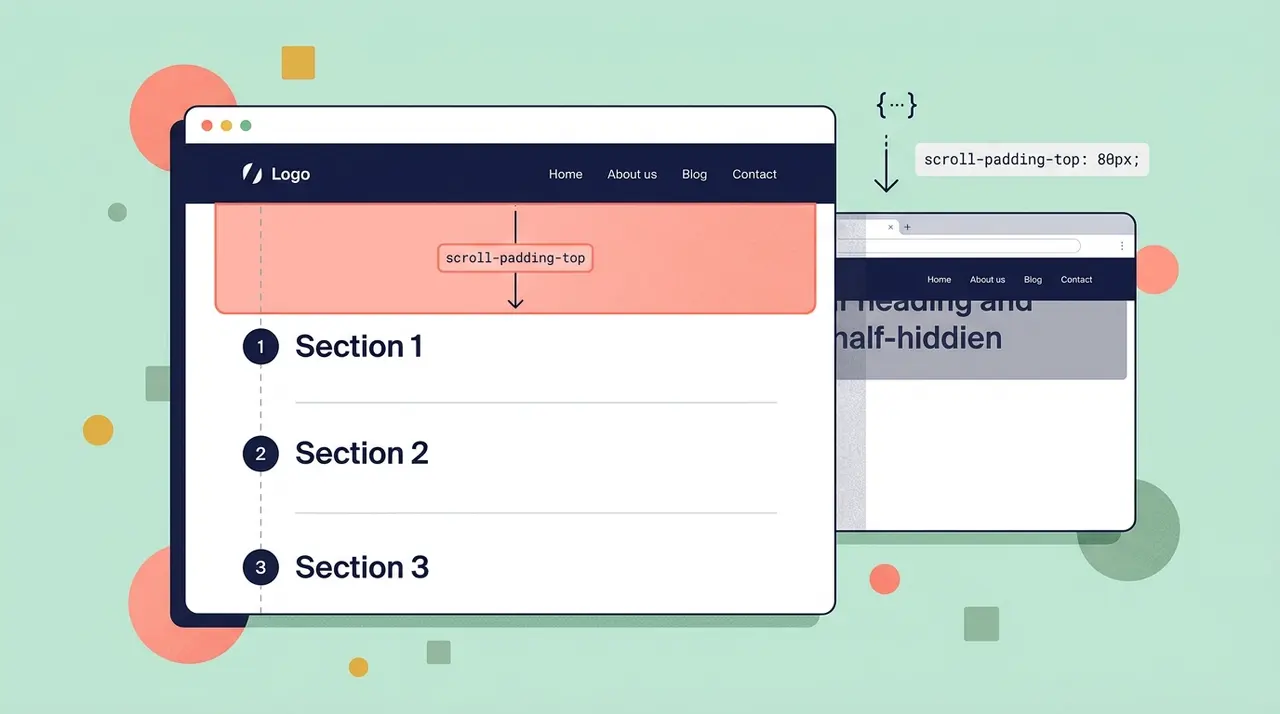
Anchor links that land a heading directly under a sticky header are a CSS layout bug, not a JavaScript problem. Setting scroll-padding-top on the html element tells the browser to stop scrolling early by the height of your header, so the target lands below it instead of hidden underneath. Pair it with scroll-margin-top on individual elements when you need per-section overrides, and you can delete every hand-rolled offset calculation you've written for this.
Why anchor links break under sticky headers in the first place
When a browser follows a fragment link like #pricing, it scrolls the page until the target element's top edge lines up with the top edge of the scrolling viewport. That's it. The browser has no concept of "there's a 64px bar floating on top of everything, please stop 64px early." Your position: sticky or position: fixed header sits in its own visual layer, but scrolling math doesn't know it's there.
The result is the classic bug: you click a nav link, the page jumps, and the heading you wanted to read is now half-covered by the header. For years the fix was JavaScript: intercept the click, calculate the header's offsetHeight, call scrollTo with a manual offset, maybe throttle a resize listener to keep the number fresh. It worked, but it was fragile and it ran on every click.
CSS solved this properly with the scroll-padding and scroll-margin properties, part of the CSS Scroll Snap specification maintained by the CSSWG at W3C. They're supported in every current browser engine, including Safari since 14.1, so there's no real reason to still be shipping a scroll-offset script in 2026.
The standard layout: sticky header plus anchor nav
Here's a typical structure. A header pinned to the top of the viewport, a nav with fragment links, and a handful of sections that are the actual scroll targets.
1<!-- Sticky header stays visible while the page scrolls -->2<header class="site-header">3 <nav>4 <a href="#overview">Overview</a>5 <a href="#pricing">Pricing</a>6 <a href="#faq">FAQ</a>7 </nav>8</header>910<main>11 <section id="overview">12 <h2>Overview</h2>13 <p>...</p>14 </section>1516 <section id="pricing">17 <h2>Pricing</h2>18 <p>...</p>19 </section>2021 <section id="faq">22 <h2>FAQ</h2>23 <p>...</p>24 </section>25</main>1.site-header {2 position: sticky;3 top: 0;4 height: 64px;5 background: #ffffff;6 border-bottom: 1px solid #e2e2e2;7 z-index: 10;8}With nothing else applied, clicking "Pricing" scrolls the #pricing section's top edge flush with the viewport top, right under that 64px header, hiding the heading. This is the exact bug scroll-padding was designed to fix.
How does scroll-padding-top fix this globally?
Set it once on the scrolling container, usually html, and every fragment jump in the document respects it:
1html {2 scroll-padding-top: 64px; /* matches the sticky header's height */3}That single line changes the math for the whole page. Instead of scrolling the target's edge to the viewport's edge, the browser scrolls it to 64px below the viewport's edge, which is exactly where content should start being visible. It applies to fragment navigation, Element.scrollIntoView(), and any native scroll-snap behavior. You don't touch the anchor markup, you don't touch JavaScript, and it works for links you haven't written yet.
Think of scroll-padding as padding for the scrollport itself, not for a specific element. It shrinks the effective viewport that scroll targeting cares about, on whichever side you set it (scroll-padding-top, -right, -bottom, -left, or the shorthand scroll-padding).
When do you need scroll-margin-top instead?
scroll-padding-top is a blunt instrument: one number for the whole document. That's fine when your header height is constant, but real layouts often aren't that tidy. Maybe one section has its own local sticky sub-nav stacked under the main header. Maybe a specific anchor target needs extra breathing room because it's a card with a shadow that gets visually clipped if it sits flush against the header.
That's what scroll-margin-top is for: it's the per-element equivalent, set on the target rather than the container.
1/* Global fallback for most sections */2html {3 scroll-padding-top: 64px;4}56/* This section sits under an extra sub-navigation bar,7 so it needs more clearance than the rest */8#faq {9 scroll-margin-top: 120px;10}scroll-margin-top on an element wins over scroll-padding-top on the ancestor for that specific target, so you can treat the global value as your baseline and override it only where a section genuinely needs different clearance. This is much cleaner than the old approach of giving every anchor target a data-offset attribute and reading it in JS.
A practical pattern: apply scroll-margin-top directly to every heading that acts as an anchor target instead of the wrapping section, especially if your sections have top padding of their own. That keeps the offset tied to the exact element the user is meant to read, regardless of how the surrounding container is padded.
1/* Apply directly to headings that serve as jump targets */2h2[id] {3 scroll-margin-top: 80px;4}The smooth scrolling gotcha
Add scroll-behavior: smooth and both properties keep working exactly the same way, the animation just eases into the corrected position instead of snapping to it. But there's a real accessibility problem hiding here: smooth scrolling is a motion effect, and some users have told their OS they don't want motion effects. Respect that by gating it behind a media query:
1html {2 scroll-padding-top: 64px;3}45@media (prefers-reduced-motion: no-preference) {6 html {7 scroll-behavior: smooth;8 }9}The prefers-reduced-motion media feature is well supported and this is the correct default: smooth scrolling only for users who haven't asked their system to reduce motion. If you skip this, you're forcing an animation on people who explicitly opted out of animations at the OS level, which is a genuine, testable accessibility failure, not a nice-to-have.
The other gotcha is more mundane but bites harder in practice: dynamic header heights. If your header grows on mobile (wrapping nav items, a promo banner, a second row that appears above a certain breakpoint), a single hardcoded scroll-padding-top: 64px will be wrong on the layouts where the header is taller. The fix isn't JavaScript, it's a media query matching your existing responsive breakpoints:
1html {2 scroll-padding-top: 64px;3}45@media (max-width: 600px) {6 /* Header wraps to two rows on narrow viewports */7 html {8 scroll-padding-top: 104px;9 }10}If your header height genuinely changes at runtime (a banner that dismisses, a search bar that expands), CSS custom properties bridge the gap without reintroducing scroll-offset math in your click handlers:
1: root {2 --header-height: 64px;3}45html {6 scroll-padding-top: var(--header-height);7}1// Only the header height changes; scrolling math still lives in CSS.2// Run this on resize/load, or whenever the header's actual height changes.3function syncHeaderHeight() {4 const header = document.querySelector(".site-header");5 document.documentElement.style.setProperty(6 "--header-height",7 `${header.offsetHeight}px`8 );9}1011syncHeaderHeight();12window.addEventListener("resize", syncHeaderHeight);Notice what this script does and doesn't do. It measures one number and writes it to a custom property. It never calls scrollTo, never intercepts click events, never math's out a destination. The scrolling behavior itself stays entirely in CSS, which is the point: JavaScript's job shrinks down to "keep this one variable accurate," and the browser handles every actual scroll.
Where this approach falls short
It's not magic for every case. scroll-padding and scroll-margin only affect scrolling triggered by fragment navigation, scrollIntoView(), and scroll-snap. They do nothing for scrolling triggered by scrollTo() calls with explicit pixel coordinates, so if you have custom scroll-to-top buttons or a "back to section" widget built on raw coordinates, you still need to account for header height there, or better, refactor them to call scrollIntoView() on the target element so they inherit the same CSS-driven offset for free.
Also worth knowing: these properties affect the scroll container they're set on, and scroll-padding on html assumes html (or body, depending on your CSS reset) is the element that actually scrolls. If you've built a layout where a nested div with overflow: auto is the real scrolling context instead of the document itself, set scroll-padding-top on that div, not on html. This trips people up in single-page app shells with a fixed-height content pane.
Browser support is solid across the board: Chrome and Edge have supported both properties since Chrome 69 (2018), Firefox since 68, and Safari added scroll-margin and scroll-padding support in 14.1. Check caniuse.com if you need to confirm support for a specific older browser target, but for any project shipping in 2026 this is safe to use without a fallback.
Verifying the fix works
Test it the way a user would break it, not just the happy path. Click every nav anchor and confirm the heading clears the header with a consistent gap. Then resize the viewport down to your narrowest breakpoint and repeat, since that's where a hardcoded offset usually falls apart first. Open your OS accessibility settings, turn on "reduce motion," and confirm the jump is now instant rather than animated. Finally, load a URL with the fragment already in it (yoursite.com/page#pricing) directly, not by clicking, since some older offset-calculation scripts only ran on click handlers and silently failed on direct fragment loads. CSS scroll-padding has no such gap: it applies the same way regardless of how the browser arrived at the scroll.
Related Articles

Animating to height auto using CSS interpolate-size
height: auto was never a number the browser could interpolate toward, which is exactly why it never animated at all. These two features finally give the engine something concrete to target.

aspect-ratio: The Property That Changes How You Think About Responsive Layouts
The padding-top: 56.25% trick requires position: relative on the parent and breaks badly with images that haven't loaded yet. aspect-ratio collapses all of that into a single declaration.

Controlling Scroll Boundaries with overscroll-behavior
Scrolling a chat panel to its last message and watching the whole page jump behind it is called scroll chaining, and it's almost always unwanted. One CSS property stops that handoff cold.