Dynamic Viewport Units: dvh, svh, and lvh Explained
iOS Safari calculated 100vh against the collapsed address bar, cutting off content the moment it reappeared on scroll. These three dynamic viewport units finally fix that mobile height bug.
Paul Radford — Full-Stack Developer & Editor. Paul is a full-stack developer and editor of template.tips. Articles here are AI-drafted and reviewed by Paul, who knows the code well enough to catch what's wrong and cut the hype.
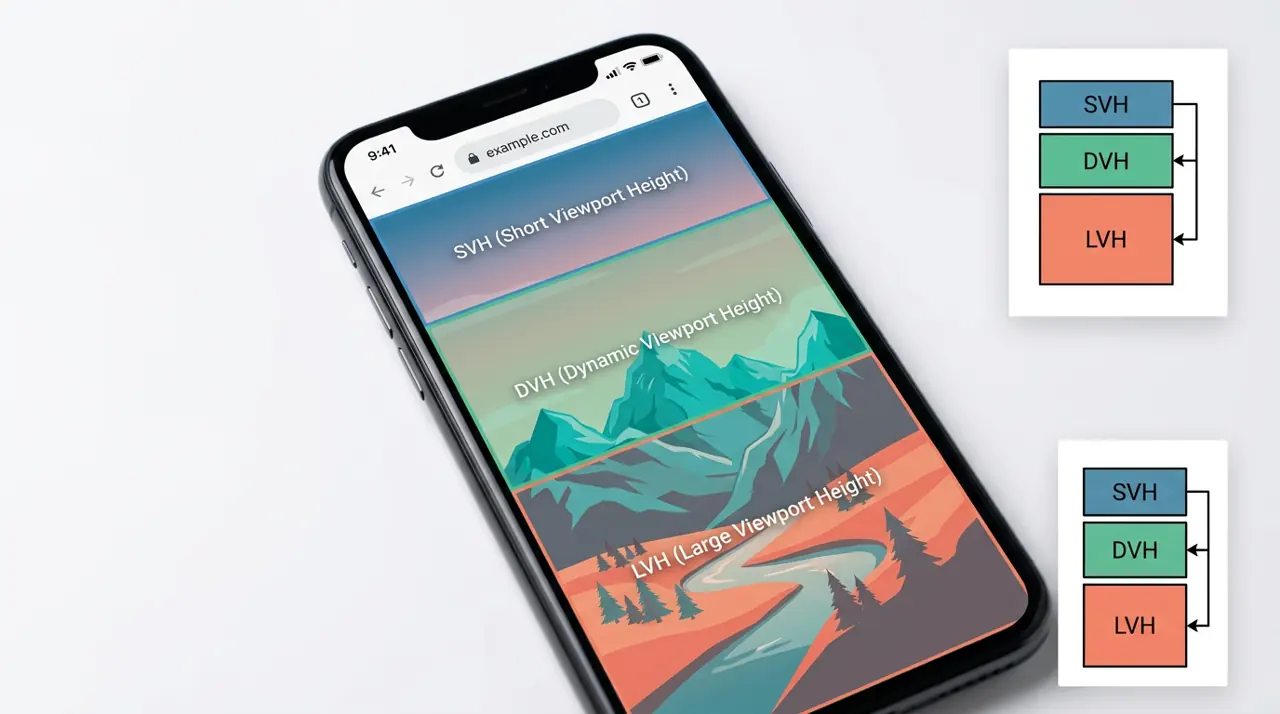
Dynamic viewport units solve the mobile browser chrome problem: dvh recalculates as address bars and toolbars show or hide, svh locks to the smallest possible viewport (chrome fully expanded), and lvh locks to the largest (chrome collapsed). Use dvh for anything that must fill the visible screen without gaps or overlap.
Why did vh ever need fixing?
The original vh unit (1vh = 1% of the viewport height) was defined against the initial containing block, and browsers interpreted that inconsistently on mobile. Safari on iOS calculated 100vh against the largest possible viewport, the one you'd get with the URL bar collapsed. The result: a height: 100vh hero section would render taller than the visible screen the moment the address bar was showing, cutting off content or leaving a scrollbar-inducing overflow at the bottom.
Android Chrome did something similar but not identical, and the two platforms drifted further apart as browser vendors added collapsing toolbars, bottom navigation bars, and safe-area insets for notches. Developers ended up hand-rolling JavaScript that read window.innerHeight, wrote it to a CSS custom property on resize and scroll, and hoped the reflow didn't cause jank. That workaround is still floating around in a lot of production codebases, and it's the main thing dynamic viewport units are meant to retire.
The CSS Values and Units Level 4 spec formalizes three flavors of viewport-height unit specifically to address this: small, large, and dynamic, plus their width equivalents (svw, lvw, dvw) and block/inline logical variants (svb, lvb, dvb, and so on).
What each unit actually measures
- svh (small viewport height): the viewport height when all retractable browser UI is fully expanded. This is the safest, most conservative number, it never changes as you scroll.
- lvh (large viewport height): the viewport height when retractable UI is fully retracted. This is the largest the viewport can get.
- dvh (dynamic viewport height): recalculates live as the browser chrome expands or collapses. It sits between svh and lvh depending on the current state.
The same logic applies to svw, lvw, and dvw, though width rarely changes due to toolbar behavior, most of the action is vertical, driven by address bars and bottom nav sliding in and out.
1/* Static baseline: same value everywhere, may be too tall or too short */2.hero-old {3 height: 100vh;4}56/* Conservative: never causes overflow, but leaves a gap when chrome hides */7.hero-safe {8 height: 100svh;9}1011/* Fills the screen once chrome collapses, but overflows while chrome is visible */12.hero-max {13 height: 100lvh;14}1516/* Tracks the real, current viewport as chrome animates in and out */17.hero-dynamic {18 height: 100dvh;19}When should you actually reach for dvh instead of svh?
This is the decision that matters more than memorizing definitions. dvh is the right choice when a layout must visually fill the screen at all times and you're fine with it resizing as the user scrolls (since scrolling is what triggers chrome collapse on most mobile browsers). Full-bleed hero sections, splash screens, and single-page app shells that need height: 100dvh on a root wrapper are the classic case.
svh is the better choice when resizing itself is the problem. If you have a fixed bottom sheet, a modal, or a chat input bar pinned with position: fixed and sized against the viewport, letting its height jump every time the toolbar animates can feel worse than just picking the conservative number once. A svh-based layout might waste 40 to 60px of space at the bottom on some devices, but it never shifts content unexpectedly mid-interaction, which matters a lot for form inputs and anything with focus state.
lvh is rarely the right default. Its main use is intentional overflow, an image or background that should extend under the browser chrome so there's no visible seam when the chrome collapses, since collapsing reveals rather than repaints.
1/* Chat app pattern: input bar height stays stable while typing */2.chat-input-bar {3 position: fixed;4 bottom: 0;5 left: 0;6 width: 100%;7 /* svh avoids the bar jumping as the keyboard/toolbar interact */8 min-height: 8svh;9 padding: 0.75rem 1rem;10}1112/* Full-bleed splash screen: should always match the visible viewport */13.splash-screen {14 height: 100dvh;15 display: grid;16 place-items: center;17}What actually happens with dvh on iOS Safari?
There's a real gotcha here worth knowing precisely. Safari on iOS shipped support for dvh, svh, and lvh starting in Safari 15.4 (March 2022), which was ahead of some desktop browsers on this feature. But the recalculation behavior isn't identical across iOS versions. On some builds, 100dvh recalculates on scroll-driven chrome collapse but not always immediately, there can be a visible one-frame jump as the browser finishes its own chrome animation and CSS catches up. That's a rendering-engine timing quirk, not a spec violation, but it means you should not rely on dvh for pixel-perfect frame-matched animations tied to scroll position. If you need that level of precision, you're better off reading visualViewport.height via the Visual Viewport API in JavaScript and driving the animation yourself.
Desktop browsers mostly don't have retractable chrome, so svh, lvh, and dvh typically resolve to the same value there, meaning most of this only matters for mobile testing.
Cross-browser support you should verify before shipping
As of early 2026, dynamic viewport units have broad support across Chrome, Edge, Firefox, and Safari, all have shipped support since roughly 2022, per caniuse data on viewport units. Firefox added support in version 101 (2022). Chrome and Edge followed shortly after in Chrome 108. That means anything targeting a browser baseline from the last three to four years is safe using these units directly, no polyfill needed.
The nuance is older or niche environments: some in-app webviews (certain versions of embedded browsers inside social media apps) lag behind the main browser release cadence, and legacy Android WebView builds tied to older OS versions may not resolve the units at all. Because these are just length units, unsupported browsers don't throw errors, they simply ignore the declaration if it can't be parsed, so always pair a dvh rule with a fallback:
1.full-bleed {2 /* Fallback for browsers that don't parse dvh at all */3 height: 100vh;4 /* Overridden by browsers that support dynamic viewport units */5 height: 100dvh;6}Because CSS cascades and the second declaration wins only if the browser understands it, this pattern degrades gracefully rather than silently failing.
Testing this properly instead of guessing
Don't trust a desktop browser's responsive mode alone here, it doesn't simulate collapsing toolbars accurately in every case. The most reliable check is on an actual phone: load a page with a 100dvh hero, scroll down enough to collapse the address bar, then scroll back up. Watch whether the hero resizes smoothly or snaps. Repeat the same test with 100svh and 100lvh versions side by side (a quick way is a page with three stacked full-height sections, each using a different unit, labeled) so you can see the actual pixel difference on your specific device rather than relying on spec text.
For automated regression coverage, Playwright and Cypress can emulate mobile viewports but generally can't simulate real browser-chrome collapse animations, since that's a native UI behavior outside the rendered page. The practical workflow most teams settle on is: use dvh with a vh fallback for anything full-bleed, use svh for fixed elements where layout stability matters more than filling every pixel, and manually verify on two or three real devices (an iPhone on Safari and an Android phone on Chrome cover the majority of the address-bar-collapse behavior differences) before merging. Automated tests catch regressions in the CSS itself; they won't catch the one-frame jump that only shows up on a real device with a real animating toolbar.
Related Articles

Animating to height auto using CSS interpolate-size
height: auto was never a number the browser could interpolate toward, which is exactly why it never animated at all. These two features finally give the engine something concrete to target.

aspect-ratio: The Property That Changes How You Think About Responsive Layouts
The padding-top: 56.25% trick requires position: relative on the parent and breaks badly with images that haven't loaded yet. aspect-ratio collapses all of that into a single declaration.

Controlling Scroll Boundaries with overscroll-behavior
Scrolling a chat panel to its last message and watching the whole page jump behind it is called scroll chaining, and it's almost always unwanted. One CSS property stops that handoff cold.